Chef Tasos - Food Ordering
An interactive restaurant web app featuring a fly-to-cart animation that visually guides menu items into the basket.
Live sitehttps://www.cheftasos57ocean.com/
Project Overview
This project began as a small design experiment. My wife, a UI/UX designer, was exploring an interactive ordering concept where food items visually move into a container when selected, creating a playful user experience. At the time, it was never intended to become a real product—just a way to explore motion and interaction design.
Unexpectedly, the concept caught the attention of a small to-go food restaurant located inside a hotel in Miami, US. The client responded positively to the interaction and visual style, and requested that the original wooden plate be replaced with a picnic-style basket to better match their restaurant concept.
As the project moved toward production, they requested an ordering flow specifically designed for in-hotel use. Guests place their orders through the website, enter their room number during checkout, and the order is sent directly to the kitchen. Once the food is ready, guests pick up their order themselves at the restaurant, without any delivery step involved.
This project was built in close collaboration with a UI/UX Designer, where the interface was fully designed and validated first before being implemented into code.
My Role
I worked on this project as a Full Stack Developer, responsible for both frontend and backend development.
On the frontend, I implemented the interactive, animation-driven ordering flow, focusing on smooth state transitions and responsive UI behavior.
On the backend, I handled API design, order management, payment integration, and admin panel for restaurant operations.
My main focus was aligning UI interactions, backend logic, and business requirements into a single, well-integrated system.
Tech Stack
- Frontend: Next.js for interactive UI and custom animation logic
- Backend: Laravel for API design and business logic
- Admin Panel: Filament for internal restaurant operations
- Payment: Stripe (Payment Intents) for secure checkout
- Deployment: Laravel Cloud & Vercel
Project Goals
From the beginning, I set a few clear priorities:
- Keep the ordering flow smooth and intuitive, driven by animation rather than traditional UI transitions
- Ensure animations enhance usability instead of becoming a performance liability
- Build a secure and real-time payment flow suitable for production use
- Provide a self-service admin dashboard so the restaurant team can operate independently
- Deliver a system that could scale beyond a demo and handle real customer traffic
Solution & Implementation
I structured the project by keeping visual interactions and system logic separate, while making sure both worked together smoothly through a clear data flow.
Frontend Interaction & Animation
On the frontend, I implemented an ordering experience where animations respond directly to user actions:
- Selecting a menu item triggers an animated transition into a basket
- Once a basket reaches its capacity, a new basket is generated dynamically
- Removing items plays a reverse animation instead of abruptly updating the UI
Design Iteration & Client Feedback
Early in the project, the client requested a change from the original container concept to a basket-based interaction. The update was made at the design stage by the UI/UX Designer to better align with familiar ordering behavior. My responsibility was to bring this updated design to life, translating it into smooth animations and handling the technical details needed to make it work reliably in real usage.
Checkout & Payment Experience
For payments, the client requested support for both card payments and Apple Pay to ensure a fast and familiar checkout experience for hotel guests. I integrated Stripe using Payment Intents, allowing payments to be processed securely in real time while keeping the checkout flow simple and reliable.
In addition to the main ordering flow, the client also asked for a clear visual confirmation after payment.. Once a payment is successfully confirmed, the system displays a receipt animation that visually prints out from a virtual printer, providing clear feedback that the order has been completed.
Backend Architecture & API
On the backend, I designed and implemented the core system and business logic, exposing APIs consumed by the frontend for menu data, order creation, and secure checkout.
Restaurant Admin Dashboard
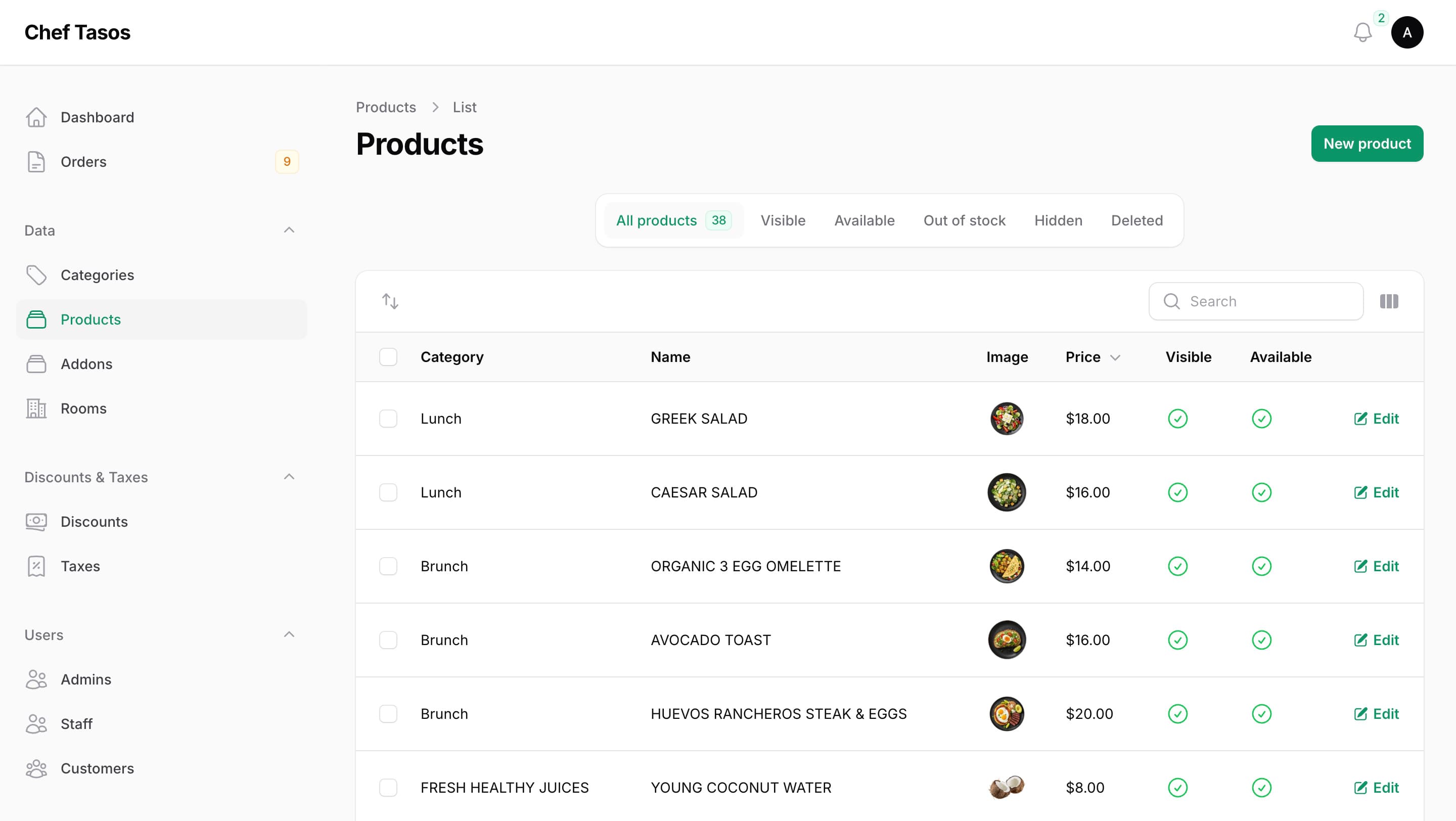
Alongside the API layer, I built an internal restaurant admin dashboard that operates on the same domain models and business logic as the ordering system. Through this dashboard, the restaurant team can:
- Manage menus and categories
- Monitor incoming orders in real time
- Update order statuses
- Configure tax and discount rules
- Manage users and staff access levels
By centralizing operational controls in a single interface, the restaurant team can manage daily operations on their own, without relying on technical support, while keeping both the customer experience and internal workflows in sync.
This approach allowed the UI to remain expressive and interactive, while the backend system remained clean, predictable, and production-focused.
Technical Challenges
For me, the most challenging part of this project wasn’t the backend or the payment integration, but the animation system itself.
All UI motion was implemented from scratch, which required solving several problems at once:
- Calculating item positions during animated transitions
- Handling edge cases when baskets reached their capacity
- Coordinating reverse animations when items were removed
- Keeping animations smooth without blocking rendering or state updates
While the interactions appear simple on the surface, they demanded careful coordination between state management, layout measurements, and animation timing. From my experience, even small mismatches between these layers could easily break the illusion of a natural and responsive interaction.
Results
After several rounds of testing and refinement, the system went live and is now actively used by the restaurant. Customers use the ordering interface to place and pay for their orders, while the restaurant team manages menus and monitors incoming orders through an internal admin dashboard.
Customer Ordering Experience
This shows the customer-facing ordering interface used by hotel guests. Menu items move into the basket through animation-driven interactions, creating a clear and engaging ordering flow.
Payment Confirmation Experience
This screen appears after a successful payment. As requested by the client, a custom receipt animation visually prints out from a virtual printer, providing clear confirmation that the order has been completed.
Restaurant Admin Dashboard
This screenshot shows the internal admin dashboard used by the restaurant team to manage menus, orders, and daily operations. The system allows staff to operate workflows independently without relying on technical support.
Client Feedback
You and your partner are amazing much helped! I will contact you for future project.